Flat Equalizer - Bass Booster
- 4.7
- Rating
- 10.00M
- Installs
- Free
- Price

 Analysis by App-foxy
I installed Flat Equalizer - Bass Booster because I wanted a more practical way to adjust music on an Android phone without constantly changing the system volume or searching through every player’s audio settings. It is a free music and audio app from Beat Blend Labs, aimed at people who want to shape sound quickly with an equalizer, bass control, and volume enhancement in one place.
My first impression was that it makes sense for a very specific everyday problem: the same headphones can sound too thin with one playlist, too harsh with another, and too quiet when I move from a quiet room to a noisy commute. Instead of treating those situations as separate problems, the app puts the main controls together. That makes it more useful than a simple volume slider, although it also means the quality of the result depends heavily on the phone, headphones, and music app being used.
From a flat starting point to a more comfortable listening setup
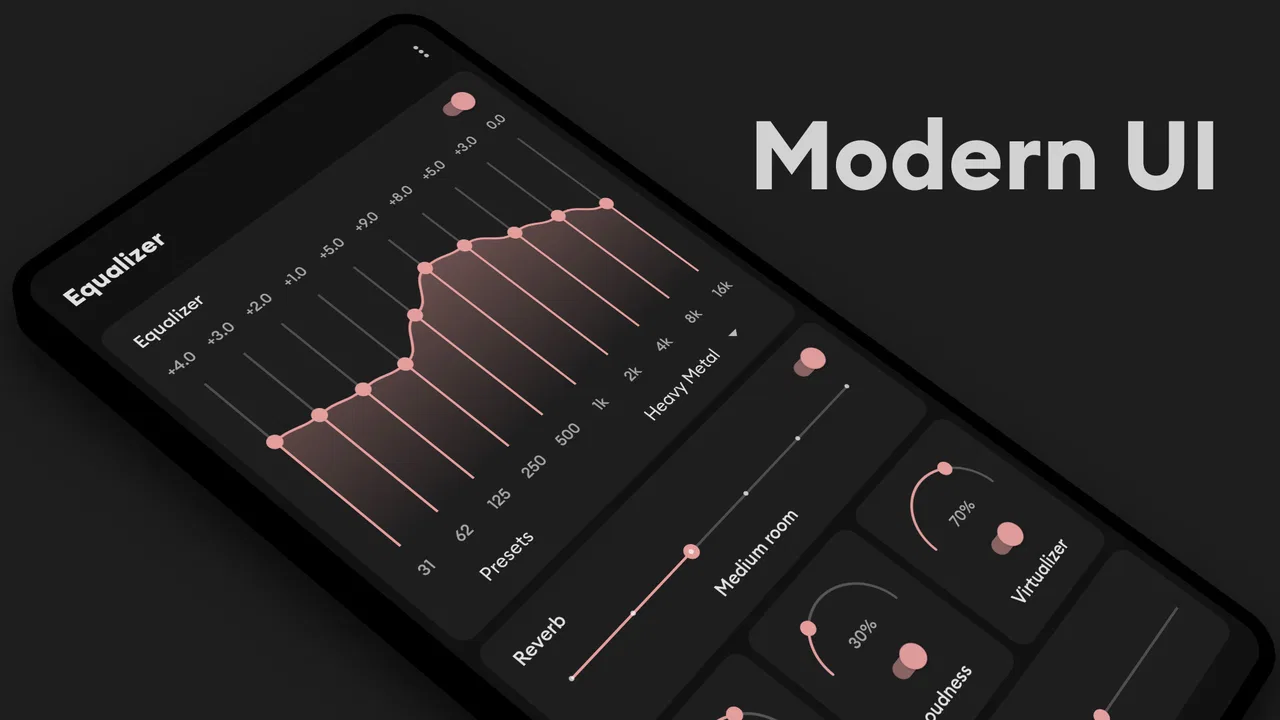
The app’s short description calls it “Flat Equalizer,” and that is a useful way to understand its starting point. I can begin with a relatively neutral sound and then make deliberate changes rather than relying on a dramatic preset immediately. That approach is especially helpful when I am trying to correct a pair of inexpensive earbuds or make spoken audio easier to follow without turning everything up.
You May Also Like

 Blood Strike: 2.5 Anniversary
Blood Strike’s Loadouts Turn Every Drop Into a Tactical Gamble
A close look at Blood Strike’s custom loadouts: how fast access to signature weapons reshapes its battle royale rhythm, rewards preparation, and narrows the gap between fights.

 Pandora - Music & Podcasts
Pandora’s Music Is Easy to Start, but Harder to Recover
Pandora’s strength is its low-effort path from a seed to a station. Its weak spot is how much confidence it asks you to place in connection, setup, and quiet recovery.

 8 Ball Pool
 Is Built on Rivalries, Rematches, and Routine
A close look at the rivalries, rematches, shared routines, and unanswered safety questions that turn a quick pool match into a persistent mobile community.

 Samsung Music
’s Quiet Strength Is Playing What You Already Own
Its reach comes less from spectacle than from dependable access to a personal library. That simplicity is both the app’s strongest retention engine and its ceiling.

 AccuWeather: Weather Radar
AccuWeather Review: A Quick, Clear Forecast for Everyday Decisions
For everyday plans, the best forecast is the one you can understand quickly. AccuWeather makes rain timing, radar, and local conditions easy to act on, with a few trade-offs.

 Hill Climb Racing
Why Hill Climb Racing Still Turns Crashes Into One More Run
A tiny car, a bumpy hill and one more upgrade: Hill Climb Racing keeps resurfacing because its simple chaos makes every near-miss feel personal.
More From Our News Desk



The usual workflow is straightforward. I open the equalizer, choose the part of the sound I want to change, listen for a few seconds, and then decide whether the adjustment actually improves the track. I strongly recommend making small changes first. Bass boosting can make a song feel fuller, but pushing it too far can blur kick drums, reduce vocal clarity, and make the entire mix tiring. The volume booster has a similar trade-off: louder is not automatically better, particularly with small phone speakers.
One useful habit is to compare the adjusted sound with the original at a similar listening level. If the boosted version is simply louder, it can seem better for a moment even when the detail has not improved. I found that lowering the overall level before judging the equalizer setting gives a more honest comparison. This is one of the app’s practical strengths: it encourages hands-on tuning rather than forcing me to accept a fixed sound profile.
For a normal evening listening session, I might start with a track that I know well, make a modest bass change, and then check a vocal-heavy song. If the first track sounds exciting but the second becomes muddy, the setting is too aggressive for general use. A profile that works for electronic music may not suit podcasts, acoustic recordings, or video dialogue. The app is best used as a flexible adjustment tool, not as a one-tap promise that every source will sound perfect.
How I use it during an ordinary day
A realistic example is a morning commute. My phone is connected to earbuds, and the surrounding noise makes low-volume listening feel weak. I open the app and make a restrained adjustment instead of immediately raising the phone’s volume. The result can give the music more presence, but I still keep the listening level sensible. When I switch to a podcast, I reduce the bass emphasis because speech benefits more from clean midrange detail than from extra low-end weight.
That handoff between music and spoken audio is where many equalizer tools become inconvenient. A setting that makes a bass line enjoyable can make voices sound less natural. Flat Equalizer - Bass Booster is useful because it lets me respond to that change quickly, but it does not remove the need to listen and adjust. Users who want automatic, source-aware switching may prefer a player with its own carefully integrated profiles.
Another practical use is compensating for a phone speaker that feels weak in a kitchen or bedroom. A volume boost can make a video easier to hear from a short distance, but I would use it cautiously. Extra gain cannot create detail that the speaker hardware cannot reproduce. It may also make distortion more obvious. In my experience, the best outcome comes from treating the booster as a small lift for occasional situations, not as a permanent maximum setting.
What happens between the app and the audio source
The most important part of the workflow is the handoff between this app and the music or video application that actually plays the sound. The equalizer is not the recording, streaming service, podcast, or video itself. It works as an audio adjustment layer, so the final result can vary depending on what is playing and how the phone handles audio effects.
That distinction matters when troubleshooting. If a change seems to work with a song but not with a video, I would first check whether the source has switched, whether another audio control is active, and whether the difference is simply caused by the original recording. It is easy to blame the equalizer when the real issue is that two apps deliver audio at different levels or use different mixes.
I also avoid stacking several forms of processing. If the music player already applies a bass effect and Flat Equalizer - Bass Booster adds another one, the combined result can become exaggerated quickly. The cleanest workflow is to choose one main place for tonal adjustments and keep other enhancements modest. This is a non-obvious trade-off: the app gives more control, but more control also creates more opportunities for conflicting settings.
For headphones, I prefer using the app to make small corrections rather than trying to imitate a completely different sound signature. If the earbuds have sharp highs, a gentle reduction can make them easier to wear. If they lack body, a controlled bass increase may help. But software cannot fix a poor physical fit, damaged hardware, or a badly recorded track. When the problem is comfort or seal, changing the ear tips or headphones is often more effective than adding more processing.
Useful adjustments for different listening jobs
For music, I use a familiar song as a reference and check both bass-heavy and vocal-focused material before keeping a setting. For podcasts, interviews, and spoken videos, I avoid chasing a large bass effect. A clearer, less boomy presentation is usually more useful, especially when the speaker’s voice already has plenty of low-end energy.
For casual gaming on a phone, the app can be helpful when sound effects feel too quiet compared with music. I would still be careful with volume boosting because sudden effects can become unpleasant. Players who need precise competitive audio or very consistent positional cues should test carefully; an exaggerated bass range can mask smaller details. A dedicated gaming audio solution may be a better choice when accuracy matters more than fullness.
For older recordings, the equalizer can make the listening experience more comfortable, but I would not expect it to restore missing detail. A little tonal shaping may reduce the impression of thinness, yet aggressive processing can reveal hiss or compression artifacts. The best workflow is to make one change at a time, listen through a familiar section, and stop once the source becomes easier to enjoy.
One advanced tip is to judge the setting at both quiet and ordinary listening levels. Some adjustments that sound balanced late at night become too heavy when the volume rises. Another is to test the same setting after switching between the phone speaker and headphones. A profile created for earbuds may sound boomy through the speaker. Keeping a simple mental note of which type of output I am using prevents me from treating one adjustment as universal.
What the app gets right, and where it creates friction
The biggest strength is concentration. Equalizer controls, bass enhancement, and volume boosting are presented as parts of the same listening workflow, so I do not need to jump between unrelated tools whenever a track sounds off. That is particularly convenient for people who use several audio sources and want a consistent place to begin adjusting them.
It is also approachable for casual users. I do not need to understand audio engineering to hear whether a change helps. I can make a small adjustment, return to the song, and decide. At the same time, someone who enjoys detailed tuning can spend more time refining the result. This balance makes the app more flexible than a basic preset-only tool.
The limitation is that the app cannot guarantee the same outcome across every Android device and audio source. Android audio behavior can differ between phones, headphones, speakers, and media players. A setting that sounds excellent in one combination may be subtle or unsuitable in another. That is not a reason to dismiss the app, but it is a reason to evaluate it with the equipment I actually use rather than judging it from a single test.
I would also skip it if I want a completely automatic experience. The app is most rewarding when I am willing to listen, compare, and make sensible changes. Someone who wants one permanent setting with no experimentation may find the extra controls unnecessary. Likewise, people who already have a trusted player with a well-designed equalizer may gain little from adding another audio layer.
Compatibility, cost, and the practical decision
Flat Equalizer - Bass Booster is available as a free app for Android, with a minimum operating system requirement of Android five. Its current version is 6.3.5, and the Everyone content rating makes it suitable for a broad audience. The app has passed the point of being a niche experiment: it has more than ten million installs, a 4.7 average from around 576 thousand ratings, and roughly 15 thousand written reviews.
Those figures suggest that the basic idea has broad appeal, but they should not replace personal testing. Audio preferences are unusually subjective, and hardware differences matter more here than they do with many ordinary utility apps. The free entry point makes trying it low-risk, while optional in-app purchases range from $0.99 to $99.99 per item. I would look carefully at the available purchase choices before paying, especially if I only need occasional equalizer adjustments.
The developer, Beat Blend Labs, has positioned the app around direct sound control rather than turning it into a full music library or streaming service. That focus is valuable when I already have my preferred players and simply want an adjustment layer. Compared with the usual alternative of relying on a phone’s built-in sound settings, it offers a more dedicated workspace. Compared with a player-specific equalizer, it may be more convenient across different sources, but potentially less tightly integrated.
That comparison leads to the clearest buying decision. If my main problem is that several audio apps sound inconsistent, this is a sensible tool to try. If I only listen through one player and its built-in controls already solve the issue, a separate equalizer may add complexity without enough benefit. If my headphones are uncomfortable, my phone speaker is physically weak, or I need studio-level accuracy, I would spend money on hardware or choose a more specialized audio solution first.
The final outcome after a complete listening workflow
After using the app as a small correction tool rather than a permanent loudness switch, I found its value easiest to appreciate in everyday transitions: music to speech, headphones to speaker, quiet room to noisy surroundings, and older recordings to modern mixes. The outcome is not a magical transformation. It is a more controllable listening experience, provided I make restrained adjustments and check the result on the output device I actually care about.
My recommendation is simple: try it if you want hands-on control without replacing your existing music and video apps. Start with a familiar track, keep the first changes modest, compare at equal loudness, and avoid stacking several bass or volume effects. That workflow gives the app its best chance to help while avoiding the muddy sound and distortion that can come from pushing every control at once.
Flat Equalizer - Bass Booster is not the right choice for everyone, but it is a useful free starting point for Android listeners who want more than a standard volume slider. I would recommend it to casual listeners, commuters, podcast fans, and anyone trying to get more comfortable sound from existing headphones. I would skip it when automatic switching, tightly integrated player controls, or highly accurate professional monitoring matter more than flexible everyday tuning.
FAQs for Flat Equalizer - Bass Booster
01What is Flat Equalizer - Bass Booster and what does it do?
Flat Equalizer - Bass Booster is an audio enhancement app designed to improve the quality of sound on your device. It offers a range of features, including customizable equalizer settings, bass boost options, and virtualizer effects. These tools allow users to tailor their audio experience to their preferences, whether for music, podcasts, or videos.
02Is Flat Equalizer - Bass Booster easy to use for beginners?
Yes, Flat Equalizer - Bass Booster is designed with user-friendliness in mind. The interface is straightforward, with intuitive controls for adjusting sound settings. Beginners can easily navigate through presets and manual adjustments to find the perfect audio balance without needing extensive technical knowledge.
03Does Flat Equalizer - Bass Booster work with all audio apps?
Flat Equalizer - Bass Booster is compatible with most audio and video apps on Android and iOS, including popular music streaming services and media players. However, its effectiveness may vary depending on the specific app and device model, so it's recommended to test its features with your favorite apps to ensure compatibility.
04Are there any in-app purchases or ads in Flat Equalizer - Bass Booster?
Flat Equalizer - Bass Booster offers both free and premium versions. The free version includes essential features but may contain ads. For an ad-free experience and access to additional features, users can opt for in-app purchases to upgrade to the premium version, enhancing their audio customization options.
05How does Flat Equalizer - Bass Booster impact battery life and performance?
While Flat Equalizer - Bass Booster is designed to be efficient, enabling audio enhancements can increase battery usage, as it requires additional processing power. The impact on performance varies by device, but most users find it to be minimal. It's advisable to monitor your device's battery while using the app to gauge its effect.
Pros
- Intuitive user interface
- easy to navigate.
- Customizable equalizer settings for sound tuning.
- Enhances bass without distortion.
- Works with most music and video apps.
- Low battery consumption.
Cons
- Contains in-app ads that can be intrusive.
- Limited features in the free version.
- Occasional crashes reported by users.
- Requires microphone permission to function.
- Doesn't support all audio formats.

Flat Equalizer - Bass Booster
Gallery